


IPTV Expert on MacBook: Complete Guide to Easily Install and Configure the App
Do you want to watch your TV channels, movies, or series available through a legal IPTV service directly on your...
Read more →Do you want to watch your TV channels, movies, or series available through a legal IPTV service directly on your...
Read more →
Installing IBO Player on an LG Smart TV is a practical way to load and play an IPTV playlist directly...
Read more →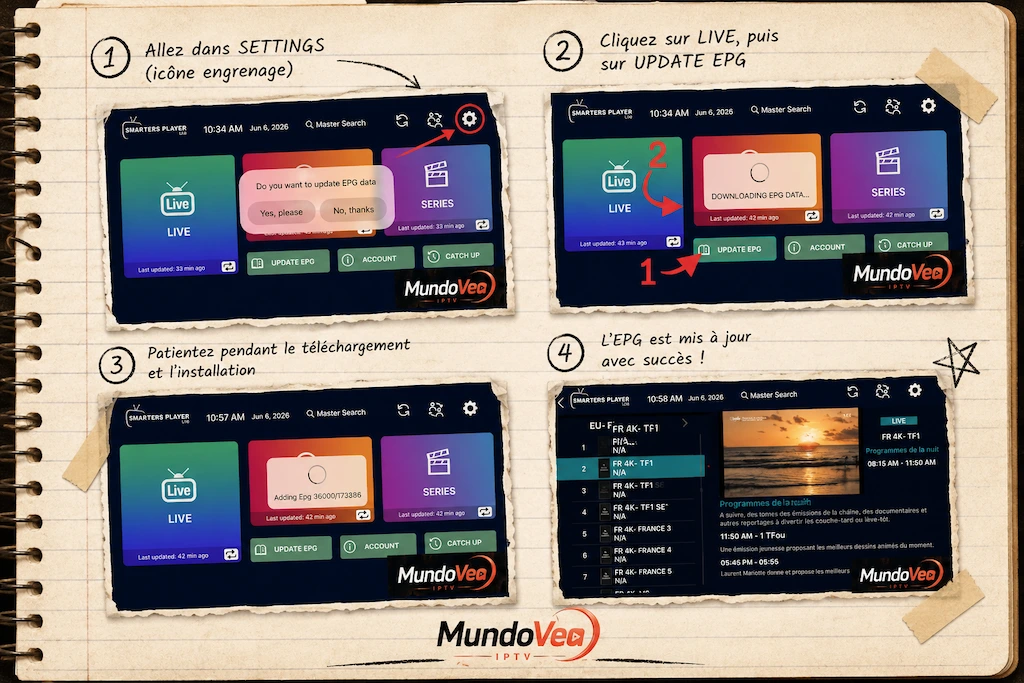
If you use Smarters Player Lite to watch your IPTV channels, you’ve almost certainly run into that annoying “N/A” showing...
Read more →
1. Introduction: The era of uncompromising 4K Ultra HD IPTV IPTV has transformed the way we consume entertainment. However, for...
Read more →
Installing OTT Premium on Samsung TV is today one of the most practical methods to access your TV channels, movies,...
Read more →Find our installation guides, subscription comparisons and the tips our team uses every day to help you get the most from your Mundo Vea service on every screen you own.
The articles here are written for both existing Mundo Vea subscribers and readers who are still considering an IPTV plan. We explain, in plain language, how a subscription actually works, which devices are genuinely compatible, which channels and packages are available, and what you can realistically expect in terms of picture quality, stream stability and activation time. Every post is reviewed by our support team so it matches what our customers experience day to day.
Our guides compare our different plans — contract length, number of simultaneous screens, whether premium channels and catch-up services are included, and pricing. We also walk you through the questions worth asking before ordering: your home broadband speed, the box or TV you already own, whether you plan to share the account with family, and whether you would rather start with a free demo. The goal is to pick the plan that fits your household, without paying for what you will not use.
A modern IPTV plan runs on Samsung and LG Smart TVs, on Android boxes, Fire TV Stick, Apple TV, MAG devices, as well as on your phone and laptop. Our tutorials walk you through installing the most-used apps — IBO Player, TiViMate, Smarters Pro, Duplex Play — and pasting your credentials or M3U link. If anything is unclear, our dedicated line (+34 632 352 241) and our WhatsApp chat are open every day.
A Mundo Vea plan is normally activated within minutes of your payment landing. On the blog we spell out real activation times by payment method, how to request a free demo before you commit, and the small habits that keep the stream stable — updating your app, restarting the router, or switching to a faster DNS. Our support team is reachable whenever you need a hand.
We publish regular reminders on the legal framework covering streaming services in the EU and UK, on the security of your payments and on how we handle your personal data. You will also find our refund policy, our terms and the full list of accepted payment methods (card, PayPal, Revolut, transfer). The idea is simple: every Mundo Vea customer should know exactly what they are subscribing to before confirming the order.
A hand-picked selection of our tested plans — fast activation, 24/7 support, free demo available.
Premium IPTV Subscription 5 Screens – 12 Months . Over. 55,000 HD, 4K, 8K channels, instant activation, 24/7 support. Compatible with Smart TV, Android, iOS and PC.
View planPremium IPTV Subscription 4 Screens – 12 Months. Over 55,000 HD, 4K, 8K channels, instant activation, 24/7 support. Compatible with Smart TV, Android, iOS and PC.
View planPremium IPTV Subscription 3 Screens – 12 Months . Over 55,000 HD ,4K ,8K channels, instant activation 24/7 support. Compatible with Smart TV, Android, iOS and PC.
View planPremium IPTV Subscription 2 Screens – 12 Months for 55,000 HD ,4k ,8k channels, instant activation, 24/7 support. Compatible with Smart TV, Android, iOS and PC.
View planPremium IPTV Subscription 1 Screen – 12 Months for . Over 55,000 HD, 4K, 8K channels, instant activation, 24/7 support. Compatible with Smart TV, Android, iOS and PC.
View planPremium IPTV Subscription 5 Screens – 6 Months for. Over 55,000 HD ,4k ,8k, Full HD quality channels, instant activation, 24/7 support. Compatible with Smart TV, Android, iOS and PC.
View planThe questions our customers ask most — activation, device compatibility, payments and support.
IPTV (Internet Protocol Television) streams TV channels over the Internet instead of an aerial or cable, delivering stable HD quality on all your devices.
Ideally, the app takes care of it on its own.
Mundo Vea works on Smart TV, Android TV, Firestick, iPhone, iPad, Android smartphones, Windows PC, Mac and any device that supports an IPTV app.
No, don't worry.
A minimum of 10 Mbps is recommended for HD. For Full HD on multiple screens simultaneously, aim for 25 Mbps or more.
Because not every channel provides its programme guide.
Activation is instant: you receive your credentials by email a few minutes after payment. Simply enter them in your IPTV application.
The EPG file can weigh several tens of megabytes depending on the size of your package.