



Official site
Official site (WHMCS Smarters)
Downloads for Android, Windows and macOS.
Premium IPTV application
Version 4.x — 2026The most-used IPTV player worldwide: Xtream Codes login in 2 minutes, complete EPG and multi-screen profiles on Android, iOS, Smart TV and PC.
Application visual
Add a featured image to display the real visual.
IPTV Smarters Pro, made by WHMCS Smarters, is the player we recommend to most new Mundovea customers: its “Login with Xtream Codes API” screen accepts the username, password and server URL we send after checkout, with no M3U file handling. It covers the programme guide (EPG), catch-up when the server offers it, subtitles, multiple audio tracks and separate profiles for the living room or the kids.
The publisher distributes the end-user app from its own website, not from Google Play or the App Store: as of October 2026 WHMCS Smarters has no official listing on either store, and the “Smarters” apps you find there or on the Microsoft Store belong to other publishers. Download the Android APK and the Windows and macOS installers only from iptvsmarters.com. On iPhone, iPad and Apple TV the official app is Smarters Player Lite.
Android phones, tablets, Android TV, Google TV and Fire TV via the APK; Windows and macOS with the publisher’s installers; the Apple ecosystem through Smarters Player Lite. There is no verifiable official app for Samsung or LG Smart TVs: on those sets you are better served by IBO Player or SmartOne IPTV.
IPTV Smarters Pro is only the player; the channels come from your subscription. When you order Mundovea you receive a username, a password and a server URL (Xtream Codes format) and, if you prefer, an M3U link. You enter them once in the app. Not a customer yet? Start with the free trial or check Mundovea pricing.
Unlike the Smart TV apps that activate by MAC address, Smarters needs no device activation: logging in is enough. If the EPG shows empty, force a refresh in the settings and wait a few minutes; if playback stutters, switch the player engine to ExoPlayer or VLC. Need a hand with the first setup? Contact us.
The application is the video player. The premium subscription provides the stable server and the credentials required to activate the channels.
Step A: The application
The player installed on your device.
Step B: Your premium credentials
The code that activates the channels.
Download the app
Choose your device, open the right link, then come back here to follow the install guide and activate your premium access.
Official site
Downloads for Android, Windows and macOS.
Choose your platform, follow the steps, then copy the required information without risk of error.
Answers stay collapsed to keep the page readable. Open only what concerns you.
Recommended articles
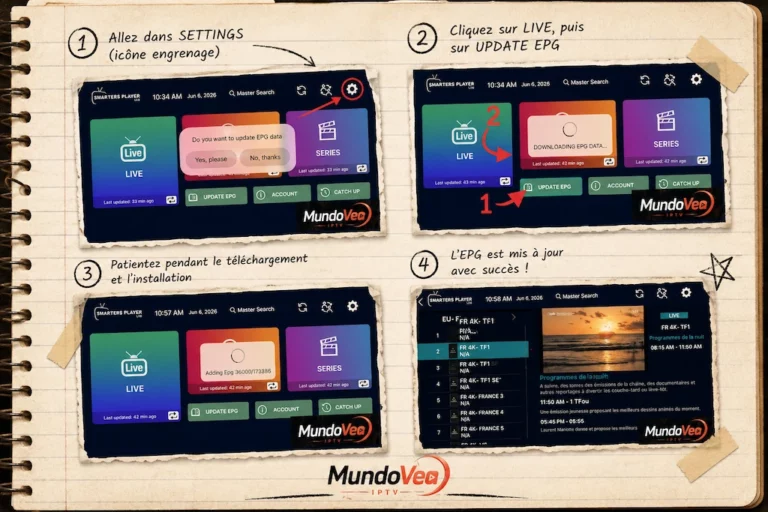
If you use Smarters Player Lite to watch your IPTV channels, you’ve almost certainly run into that annoying “N/A” showing…
Read the article
1. Introduction: The era of uncompromising 4K Ultra HD IPTV IPTV has transformed the way we consume entertainment. However, for…
Read the article
Installing OTT Premium on Samsung TV is today one of the most practical methods to access your TV channels, movies,…
Read the article