



iOS
App Store
iPhone, iPad, Apple TV and Apple-silicon Mac.
Premium IPTV application
Version 2026The free Apple release from the Smarters family: Xtream Codes API, EPG and smooth playback on iPhone, iPad and Apple TV.
Application visual
Add a featured image to display the real visual.
Smarters Player Lite is the only Smarters-family app officially published on the App Store by WHMCS Smarters. It is our free recommendation for watching Mundovea on iPhone, iPad, Apple TV and Mac: installed in a minute, it accepts M3U (and JSON) playlists and offers an EPG, favourites and multiple lists. On Android this app does not exist; there the official app is IPTV Smarters Pro.
iPhone and iPod touch on iOS 15.6 or later, iPad, Apple TV, Apple-silicon Mac (macOS 12.5 or later) and Apple Vision, always from the App Store. The “Smarters” apps on Google Play or Amazon’s store are not the publisher’s.
Free. The in-app “Premium Version” costs $1.99 and only adds player features. The official listing puts it plainly: it is “strictly a standalone media player” that provides no channels; the channels come from your subscription.
Smarters Player Lite is only the player; the channels come from your subscription. When you order Mundovea you receive a username, a password and a server URL (Xtream Codes format) and, if you prefer, an M3U link. You enter them once in the app. Not a customer yet? Start with the free trial or check Mundovea pricing.
If the programme guide stops updating, follow our guide to updating the EPG in Smarters Player Lite. For a library with artwork and sync across your Apple devices, the next step is IPTVX.
The application is the video player. The premium subscription provides the stable server and the credentials required to activate the channels.
Step A: The application
The player installed on your device.
Step B: Your premium credentials
The code that activates the channels.
Download the app
Choose your device, open the right link, then come back here to follow the install guide and activate your premium access.
iOS
iPhone, iPad, Apple TV and Apple-silicon Mac.
Official site
Publisher of the Smarters family.
Choose your platform, follow the steps, then copy the required information without risk of error.
IPTV Smarters Pro
Username / Password / Server URL
Answers stay collapsed to keep the page readable. Open only what concerns you.
Recommended articles
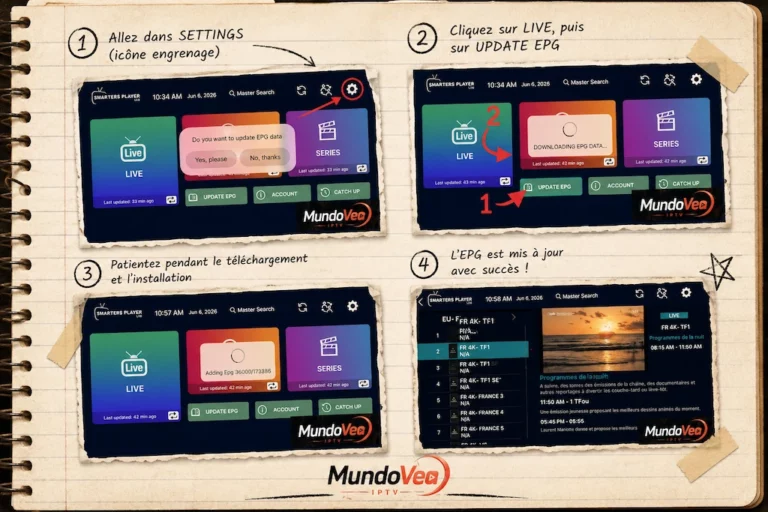
If you use Smarters Player Lite to watch your IPTV channels, you’ve almost certainly run into that annoying “N/A” showing…
Read the article
Installing OTT Premium on Samsung TV is today one of the most practical methods to access your TV channels, movies,…
Read the article